Introducing Overslash
Auth for AI Agents — give your agents service access, control and audit their use
Today we’re opening up Overslash — an identity and authentication gateway for AI agents. It sits between your agent and the outside world and does the work every agent platform ends up reinventing badly: holds the secrets, runs the OAuth, gates the destructive calls, and keeps an audit trail of what actually happened.
Why this exists
Every agent that talks to a real service — Gmail, Stripe, Calendar, GitHub — runs into the same wall. The agent needs an API key it shouldn’t be allowed to see. The OAuth flow needs a browser the agent doesn’t have. The destructive action (“delete this event”, “send this email”) needs a human in the loop, but the human can’t read raw HTTP. And every platform solves this from scratch, coupled to its own agent loop, with prompt-based “please ask before sending” permissions that the agent will eventually ignore.
I hit this wall while building, soon to be released, Overfolder, and the short version of the answer is: take auth out of the agent entirely, put it behind a separate service, and let the agent ask that service to act on its behalf. The long version — the BBQ that got me here, the desiderata for a good approval system, why none of the existing attempts hit all of them — is in a companion post: Why I built an auth gateway for AI agents.
This post is the what.
What Overslash does
Several things, all behind a single API:
- Secret vault. Encrypted, versioned, never returned over the API. The agent gets to use a credential without ever holding it.
- OAuth engine. Connect Google, GitHub, Slack, Stripe once; reuse the connection across every agent the user owns. Tokens auto-refresh.
- Permission chains. Identities are hierarchical —
Organization → User → Agent → SubAgent— and every level has to authorize an action. A subagent can’t do anything its parent agent can’t, and the parent can’t do anything the user hasn’t allowed. - Human approvals. When the chain has a gap, Overslash builds a human-readable prompt and routes it to the user. Approve once, or approve with a remembered scope (“any event on this calendar”). The agent isn’t blocked — it gets a pending handle and can keep working.
- Authenticated HTTP execution. The agent calls the action through Overslash; Overslash injects the credential and makes the request. Audit log for free. It also works for MCP!
- Service Catalog: Keep a list of services for your Org, start with the Overslash curated ones, or import any OpenAPI spec or any MCP server. Create service from the catalog and share them with group on your org.
A service catalog any human can read
The piece I’m proudest of is the approval surface. Most agent harnesses ask the user to approve a raw HTTP request, which is a non-starter outside of dev tools. Overslash uses an OpenAPI 3.1 service registry with a few custom keys to translate calls into something a person can actually read.
paths:
  /calendar/v3/calendars/{calendarId}/events/{eventId}:
    delete:
      operationId: delete_event
      summary: "Delete event {eventId} on calendar {calendarId}"
      x-overslash-risk: delete
      x-overslash-scope_param: calendarId
    parameters:
      - name: eventId
        in: path
        x-overslash-resolve:
          get: /calendar/v3/calendars/{calendarId}/events/{eventId}
          pick: summary
That YAML turns
Approve
DELETE https://www.googleapis.com/calendar/v3/calendars/primary/events/abce6476-44b3-4e16-89f7-1add4d6986dewith secretsecret_gcal_oauth_key?
into
Delete event “Crazy Party on the Moon” on calendar primary? Connection: user@gmail.com [Yes] [No] [Remember for primary] [Remember for user@gmail.com]
Same call. Different question. The first one nobody approves; the second one a human can decide on in two seconds.
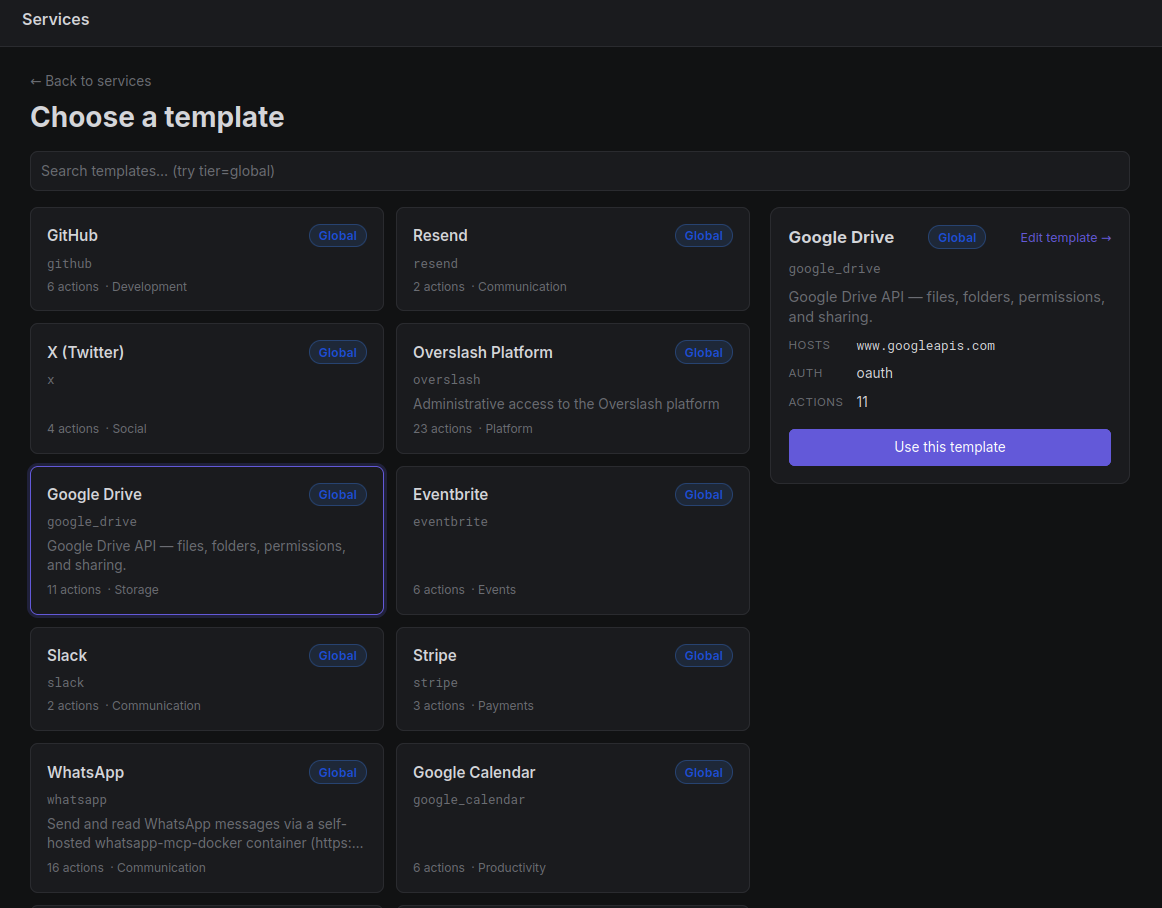 The service catalog ships many providers out of the box (GitHub, Gmail,
Google Calendar/Drive, Slack, Stripe, Resend, Eventbrite, X, Whatsapp, …), and orgs can add
their own.
The service catalog ships many providers out of the box (GitHub, Gmail,
Google Calendar/Drive, Slack, Stripe, Resend, Eventbrite, X, Whatsapp, …), and orgs can add
their own.
Approvals, in motion
When an action’s permission chain has a gap, Overslash freezes the call, builds a human-readable approval card, and routes it to whoever can answer. The agent isn’t blocked — it gets a handle and keeps working until the decision lands.
Here’s the whole loop end to end. In claude.ai I ask Claude to message a local
butcher on WhatsApp and place an order. Claude reaches for WhatsApp through
Overslash, the gateway recognizes a send as a gated action and freezes it, and
an approval card appears in the dashboard — “Allow claude to send a WhatsApp
message … ?”, flagged medium risk, in plain language rather than raw HTTP. I
approve once, the held call resolves, the message actually goes out, and the
butcher replies “Sure! Order on the way.”
Prompt in claude.ai → human-readable card in the dashboard → approve once → the WhatsApp message actually sends, all without the agent ever stalling.
The audit trail comes for free
Because every call goes through the gateway and every approval is a row in Postgres, the audit page is just a query. Filter by agent, by service, by risk, by who approved what.
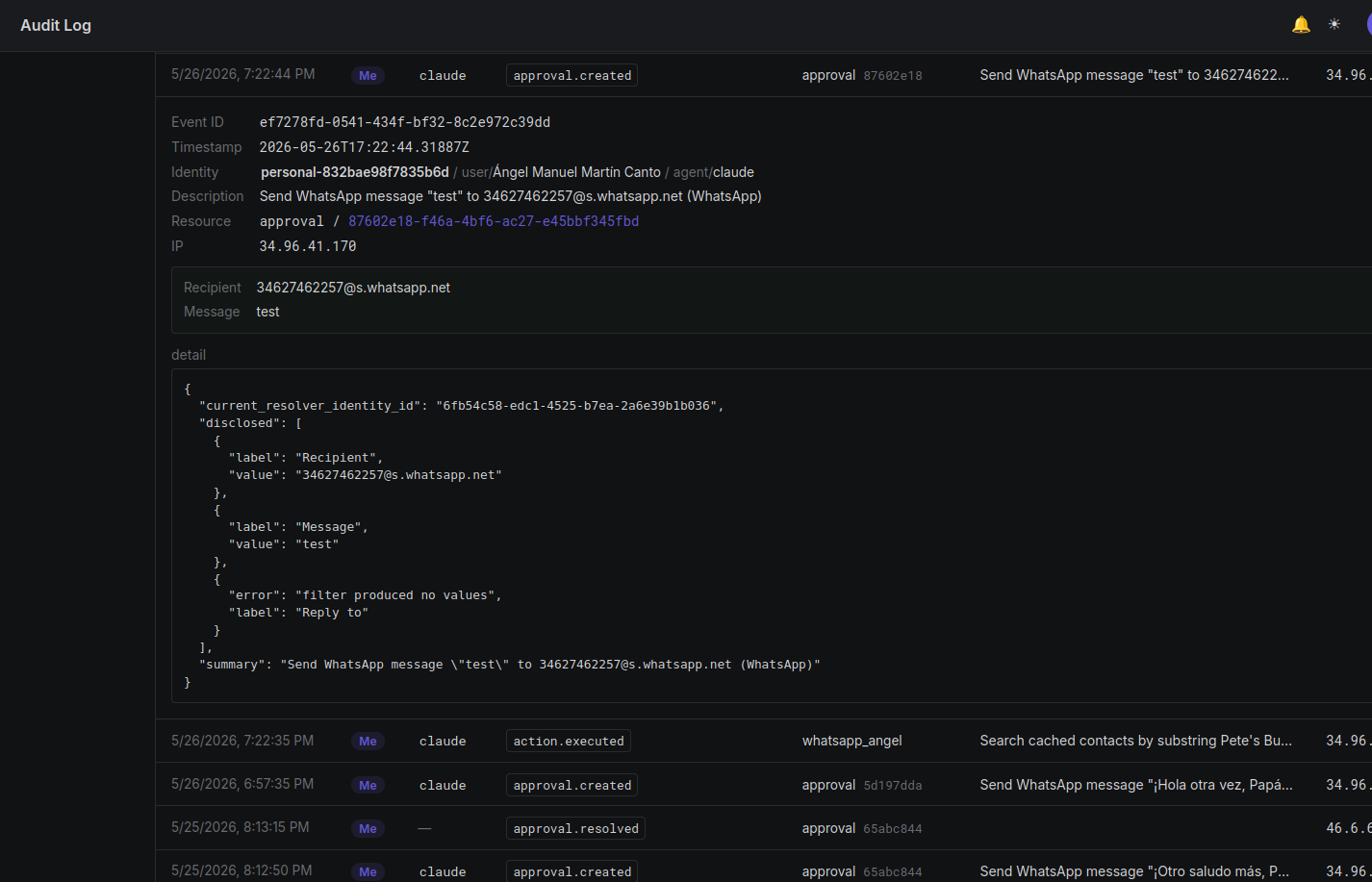 Every action, approval, and secret access — same registry, same human-
readable descriptions, with the identity that authorized each one.
Every action, approval, and secret access — same registry, same human-
readable descriptions, with the identity that authorized each one.
Three ways to talk to it
Overslash ships one backend with three peer surfaces, so it fits whatever your agent already speaks:
- REST — canonical. Any HTTP-capable agent or platform calls
POST /v1/actions/calland gets back the response. - CLI — single static
overslashbinary. Useful for shell-capable agents and ops scripts. - MCP — for editors and consumer products that speak MCP. One step and you’re wired up.
claude.ai → Overslash via custom MCP connectors
Add Overslash as a custom connector in claude.ai’s settings, run the OAuth flow once, and Claude can now call any service in your catalog with the same permission chain as the rest of your agents.
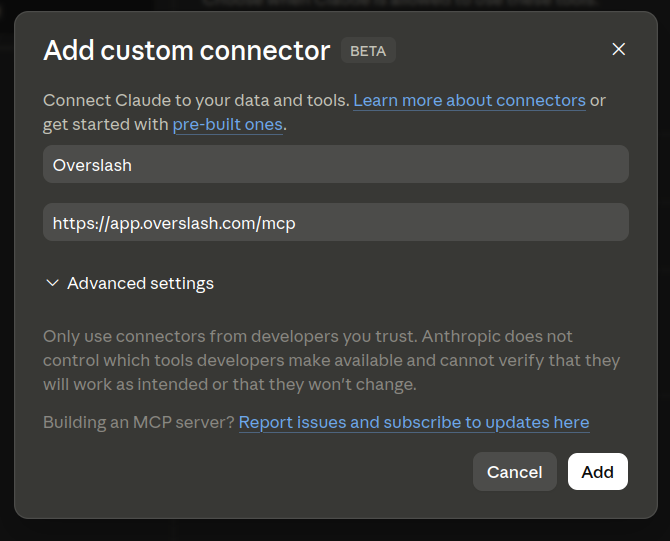
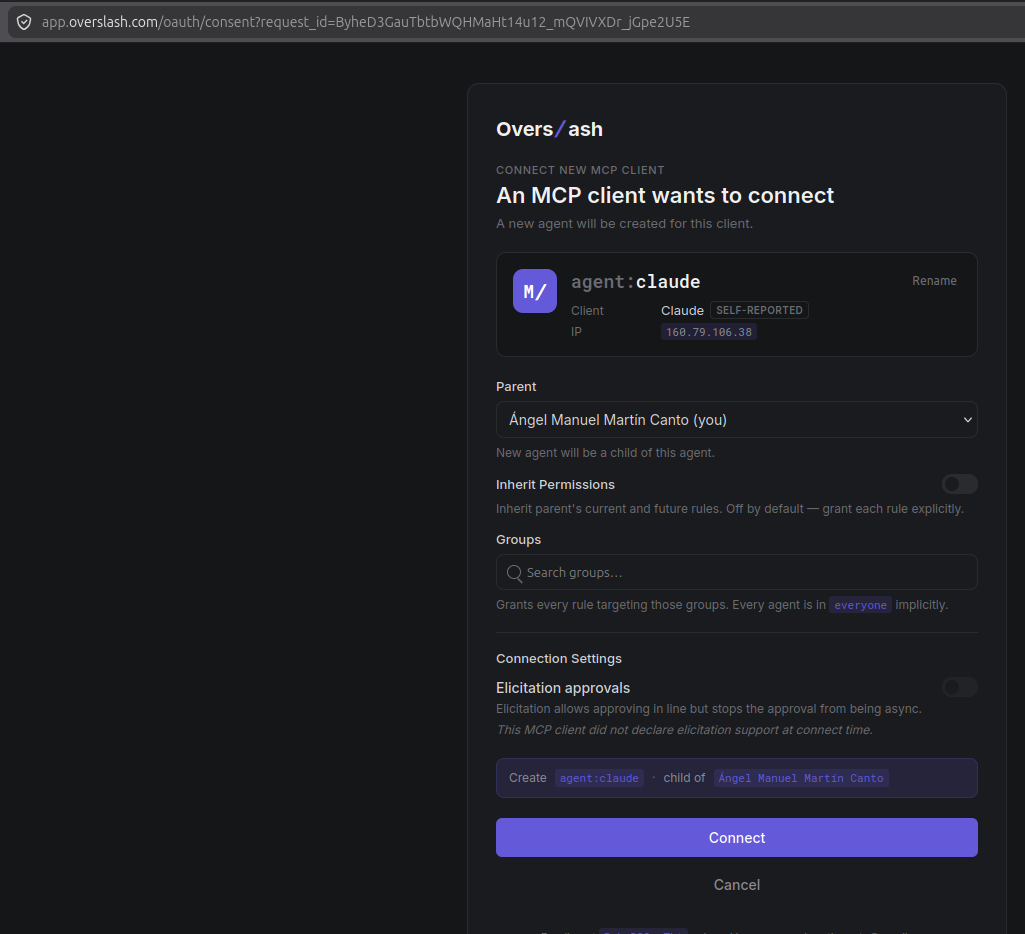
 claude.ai connects to Overslash as an agent identity owned by the signed-in
user — actions, approvals, and audit all route through the same gateway.
claude.ai connects to Overslash as an agent identity owned by the signed-in
user — actions, approvals, and audit all route through the same gateway.
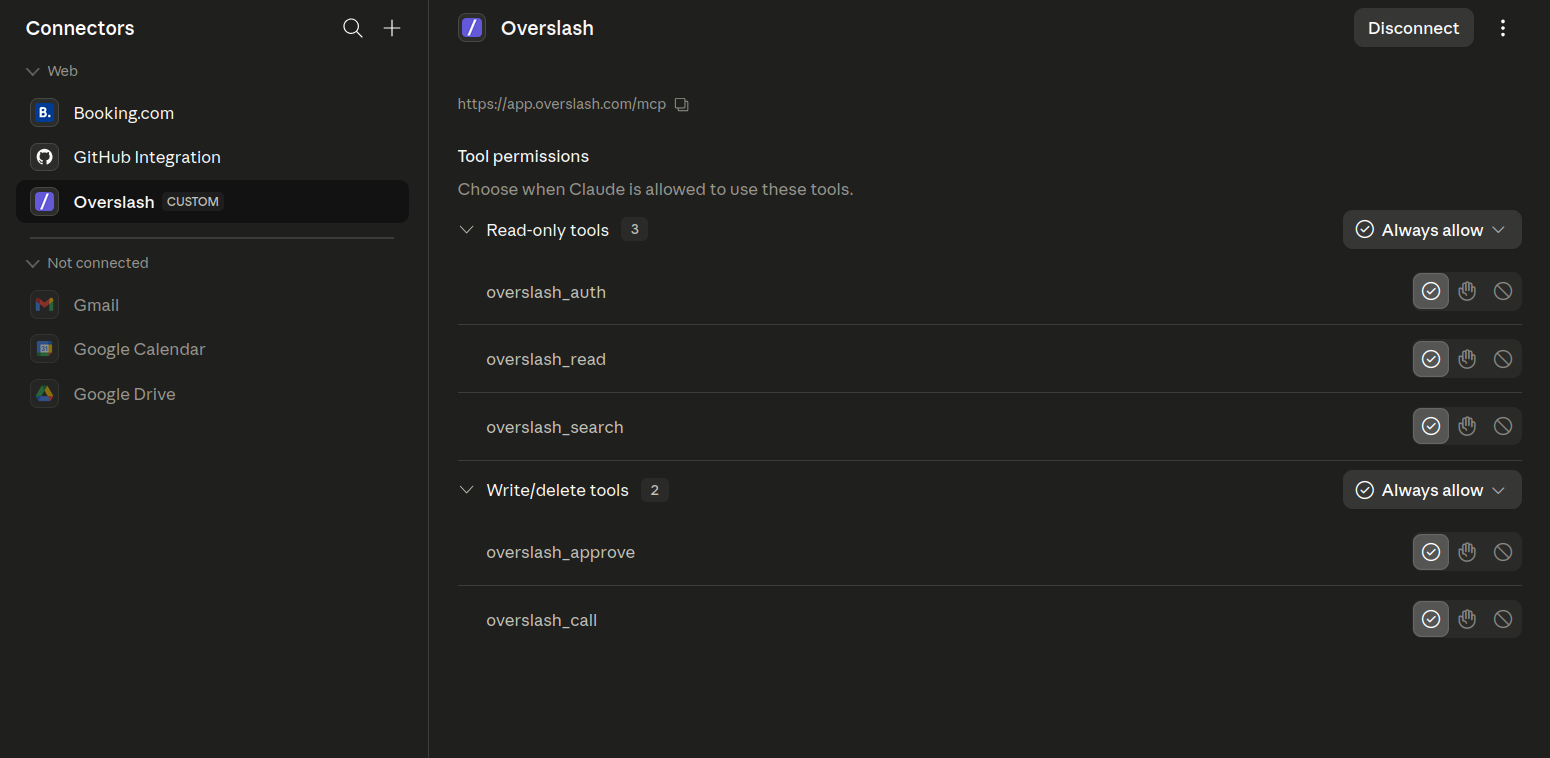
When claude.ai asks which connector tools to allow, set every Overslash tool to always allow. This isn’t loosening anything: claude.ai’s per-tool prompts gate access to the connector, but Overslash is the layer that actually governs what each connected service can do — approvals, scopes, secrets, and audit all happen at the gateway. Auto-allowing the tools just stops claude.ai from double-prompting on top of the controls Overslash already enforces, so you keep one approval flow instead of two.
That includes overslash_approve — it only approves the pending actions of an
agent’s own subagents, never its own calls, and only for things the parent
agent is already allowed to do itself. So an agent can’t use it to rubber-stamp
its own actions or to escalate beyond its own permissions. It’s safe to leave on
“always allow” with the rest.
Claude Code → Overslash with one command
claude mcp add --transport http overslash https://app.overslash.com/mcpFirst call opens a browser, you pick or create the agent identity Claude Code
will act as, and it’s done. From then on every Overslash tool
(overslash_search, overslash_call, overslash_auth, overslash_approve)
is available to the editor. One command on the terminal, one OAuth pass in the
browser, and Claude Code is acting through a scoped agent identity you can
revoke at any time.
How to try it
-
Hosted, free. Sign in at overslash.com.
-
Self-host. It’s a single Rust binary plus Postgres. The dashboard is embedded into the binary in
webmode, sooverslash webis the whole product. Source is at github.com/overfolder/overslash under Elastic License 2.0 — free to self-host, modify, and use commercially; the one carve-out is offering Overslash itself as a managed service. -
Drop-in for any agent. Tell your harness:
Your human wants to give you access to external services via Overslash. To connect, follow the instructions at: https://overslash.com/SKILL.md
Claude, Codex, OpenClaw, your own loop — they all converge on the same gateway from there.
We are dying to hear your feedback on contact@overspiral.com
— Ángel Martín